ZAMOK PRODUCT GUIDES
Deep dive: Zamok
Explore how Zamok powers the kiosk experience, manages applications and content, supports remote administration, and provides the software foundation for secure public-facing self-service.
  Other Zamok guides in this set

Kiosk Software Guide

You are here
The core kiosk management platform everything else runs on. See how Zamok controls the kiosk experience, supports remote operation, manages apps and content, and gives teams a practical foundation for public-facing self-service.
Open the Kiosk Platform guide

Remote Kiosk Management

You are here
Remote visibility and control across every kiosk in the field. This guide covers monitoring, updates, troubleshooting, remote access, device status, and the tools teams use to keep a kiosk fleet running.
Open the Fleet Management guide

AI Assistant

You are here
On-screen AI guidance for visitors who need help completing a task. This guide explains how Zamok's AI assistant can answer questions, guide users through services, reduce confusion, and support more independent kiosk interactions.
Open the AI Assistant guide

Genie Multilingual Language Support

You are here
Language support for visitors who need help reading, speaking, or translating kiosk content. This guide breaks down Zamok Genie coverage and the difference between text, voice, and full-page translation support.
Open the Genie Language guide

Video Conferencing

You are here
Live remote help between a visitor at the kiosk and staff somewhere else. This guide explains how video sessions can support assisted service, reduce front-desk pressure, and connect people to the right person.
Open the Video Conferencing guide

Self-Service Kiosk Payments

You are here
Payment workflows at the kiosk, including card, contactless, and account-based transactions. This guide explains how payment capabilities fit into the larger self-service experience and what teams need to consider.
Open the Payments guide
Zamok Kiosk Platform - Detailed Guide

Kiosk software that turns your sites and apps into one secure screen

Kiosk management software that runs your website, web app, or custom interface on a locked-down kiosk — with the workflows, security, and AI guidance to let people finish real tasks on their own, and one dashboard to run every kiosk from anywhere.

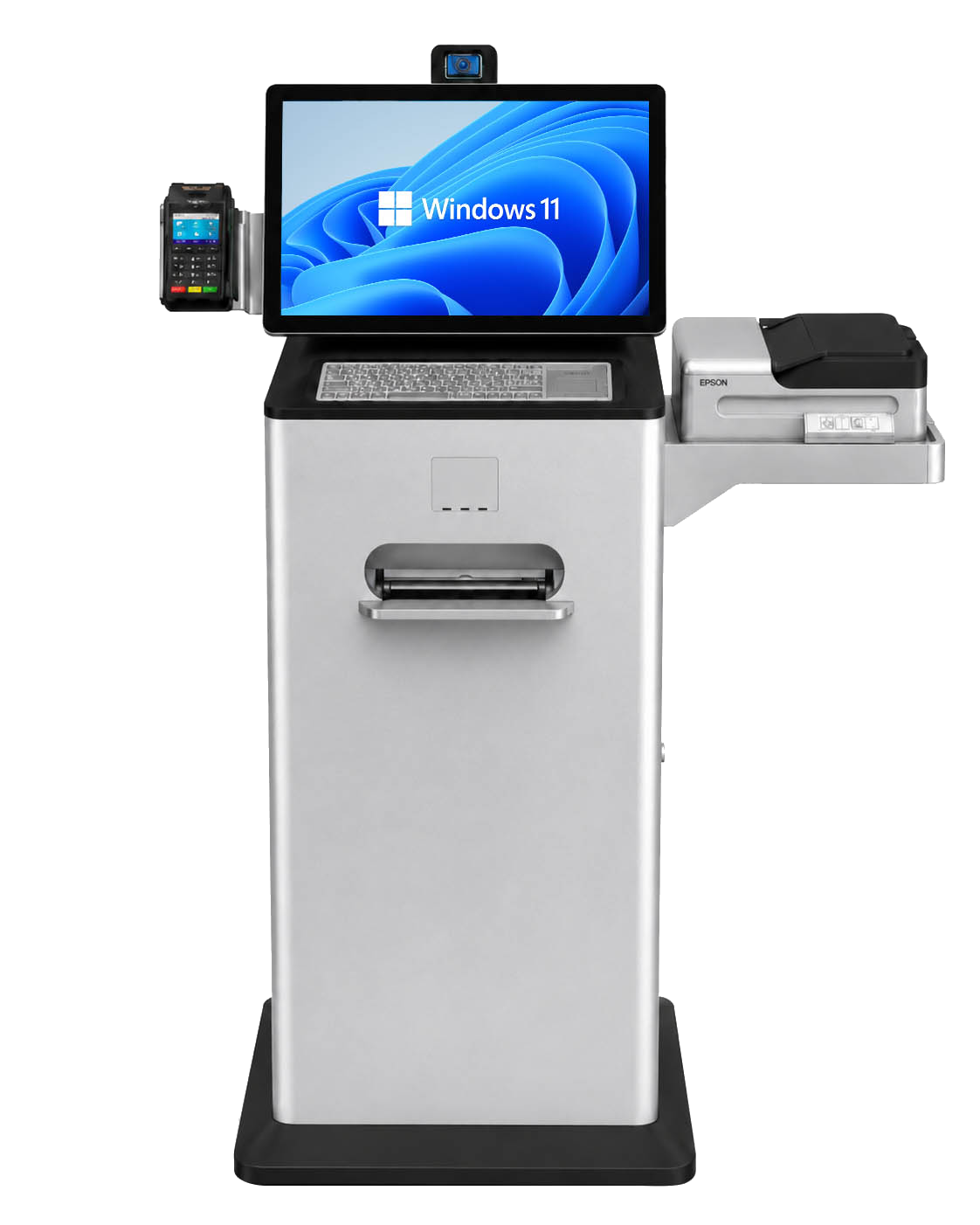
Advanced Kiosks self-service kiosk running Zamok
Zamok
The possibilities are endless.
AIZamok Project Advisor
Chat with our Zamok Project Advisor

Describe what you want people to do — talk or type, and it walks you through it.

The platform

One platform. Every part of the experience runs on it.

Zamok is the secure foundation at the center. The visitor interface, self-service workflows, live help, AI guidance, security, and remote management all run on it. Follow any path to see how that part works.

Zamok Kiosk Platform
Zamok
The secure platform
underneath it all
The Visitor Interface
The screen people walk up to
Self-Service Workflows
Scan, fill, print, pay
Live Help & Communication
Reach a real person
AI Guidance
Answers in any language
Locked Down & Private
Safe for a public lobby
Remote Management
Run the fleet from a browser
Reporting & Analytics
See what's working
The Visitor Interface
The screen people walk up to
Self-Service Workflows
Scan, fill, print, pay
Live Help & Communication
Reach a real person
AI Guidance
Answers in any language
Locked Down & Private
Safe for a public lobby
Remote Management
Run the fleet from a browser
Reporting & Analytics
See what's working
Then take it further
Solutions Powered by Zamok
Prebuilt applications like Kiosk Office Suite & Greeter
Plans & Configuration
Basic, Premium, and an Enterprise path
Resources
Guides, videos, papers, and customer proof
Why kiosk software

A screen that was not built for a public, self-service kiosk becomes a liability the moment it goes live: people wander off your page, leave a session open for the next person, print what they like, and reach what they should not — and when one goes down, someone has to drive out to fix it. Kiosk software is what closes that gap.

What it can do

Six things a kiosk has to get right

Which of these matters most depends on what you are trying to let people do — there is no ranking. Start with the one that sounds like your problem.

“Someone arrives at 8am, before staff are in, unsure where to go.”

The Visitor Interface

The screen has to make sense to a person who has never seen it and may not read what is on it. Zamok builds the front end — homepage, prompts, languages, the first ten seconds — so nobody gives up before they start.

Includes Homepage templates & designer · themes · instructional popups · welcome video · presence detection · screen saver · on-screen keyboard · multi-language · satisfaction survey
Part of every Zamok deployment
“People wait in the wrong line to hand over a form that could have been scanned.”

Self-Service Workflows

A kiosk earns its place when the visitor finishes and leaves — form filed, document scanned, payment taken, badge printed. Zamok runs the workflows that complete real work, with the peripherals to back them.

Includes Document scanning · file upload to portals · guest sign-in & badge printing · acknowledgement pages · printing · website form fill · payments (swipe / EMV / contactless / cash recycler) · peripherals
Part of every Zamok deployment
“The help desk staffed by volunteers is empty by 4:30, or was never funded at all.”

Live Help & Communication

Self-service handles most of it. For the rest, a visitor should reach a real person without leaving the kiosk — a call, a message, a face on the screen — instead of walking out.

Includes VOIP calling & directory · email · SMS alerts · video conferencing
See Video Conferencing »
“A kiosk homepage holds maybe a dozen buttons before people feel lost. A visitor walks up and asks for the thirteenth.”

AI Guidance

Most kiosk content assumes people already know what they are doing. The Assistant answers in their words and their language, aware of the page they are on, and walks them to the finish.

Includes Voice + text · 97 languages · page-aware · tool calling · presence greeting · per-kiosk config
Explore the AI Assistant »
“Put a kiosk in a lobby and it is a public PC — until it is locked down.”

Locked Down & Private

An unsecured public kiosk is a liability. Zamok runs a hardened, sandboxed browser that clears every session, blocks what should not be reached, and keeps no personal information behind.

Includes Locked-down Chromium · URL allow/block lists · download blocking · session clearing · FaceLock · no PII retained · navigation logs · blocked-site reports · user roles · hardened Windows image · Uncrashable
See Software & Security »
“A kiosk two states away needs new forms and fresh content — and nobody is driving out there to update it.”

Remote Management & Reporting

One kiosk or three hundred, you run them from a browser: push content, see what is online, pull reports, wake what is asleep — without the service call.

Includes Cloud dashboard · remote actions · per-kiosk overrides · media library · alerts · usage reports · weekly reports · sFTP export · low power mode · developer APIs
See Kiosk Management »

Workflows that need hardware — a scanner, a printer, a payment reader — pair with Advanced Kiosks peripherals; Zamok drives them but does not own the hardware catalog. See the hardware catalog »

From guide to deployment

Reading the specs is easy. Making it work in public is the hard part.

Zamok

If you are this deep in the Zamok® guide, you are probably not browsing casually. You are trying to figure out whether a kiosk can run your workflow, connect to your systems, stay locked down, support real visitors, and remain manageable after launch.

That is where our team should be involved. We can help map the workflow, identify the hardware and software pieces, flag integration risks early, and turn the guide into a practical deployment plan.

Map the workflow What the visitor needs to do, step by step, without staff intervention.
Plan the integrations Web apps, forms, payments, scanners, printers, video, and data handoff.
Design for the real world Locked-down sessions, support, remote management, and field reliability.
workflow.zamok.io / planning
Visitor
Form
Scan
Support
What we help define
The kiosk experience before anyone buys hardware.
Screens, peripherals, lockdown rules, data flow, staff handoff, support model, and what needs to happen on day one.
Better before build The right conversation now can prevent the wrong kiosk, missing integration, or unsupported workflow later.
Proof

Trusted where being down is not an option

99.99%
Session uptime target on hardened, Uncrashable Windows images
0+
Public agencies served across the US
0+ yrs
Designed, built & supported in the USA
GSA
Contract holder for public-sector buyers
Customer stories
Courts · VA
Prince William County Circuit Court

A growing network across 11 locations gives 470,000+ residents 24/7, multilingual access to essential court services.

Read the story »
Law enforcement · MN
Itasca County Sheriff’s Office

A turnkey document kiosk processed 300+ forms in its first 90 days and sharply cut front-desk workload.

Read the story »
Housing authority · NV
Reno Housing Authority

Residents self-serve rent payments, document scanning, and resource navigation — automating common lobby tasks.

Read the story »
Federal · airports
TSA · ASRC Federal

Kiosks supporting the TSA’s Touchless Identity Solution enable fast, contactless verification at major U.S. checkpoints.

Read the story »
Government · AL
Montgomery County

A 9-kiosk voter-engagement pilot across schools and libraries grew to 27+ units on strong community response.

Read the story »
Visitor management · workplace
IFF Citrus Innovation Center

A Greeter visitor-management kiosk cut check-in time 75% and alerts hosts in under 10 seconds — without burdening staff.

Read the story »
See all customer stories »

Not sure which of the six you need?

Tell the Advisor what you are going to let people do. A few questions in, it sketches a likely Zamok setup — then talks the goal through with you: what it takes, what to line up first, and where each Zamok piece fits.
Talk to a specialist
This is a public, informational overview of the Zamok Kiosk Platform. Kiosk technology — AI especially — moves quickly, so details here can fall out of date and are not a complete or binding list of capabilities. Use it to get oriented, then talk with our team and we’ll help scope what’s current and right for your project.
Zamok Overview/Kiosk Management

Manage your whole fleet from a secure browser

Authorized staff can update approved content and settings, review reports, monitor systems, and run supported management tasks — across one kiosk or hundreds — without traveling to each machine.

Talk to our team
What it solves

No more per-device visits

Public kiosks content drift out of date, go offline unnoticed, and burn staff time to service on site. A central browser-based portal keeps every location consistent, monitored, and current.

How it works

One dashboard, every kiosk

This is a working preview — select a kiosk to inspect it, push an update, or open its reports.

portal.zamok.io / fleet
Fleet Dashboard
0
Kiosks managed
0
Online now
0
Updates ready
0
Sessions / wk
City Hall — Lobby
Concord, NH
Sheriff — Front desk
Itasca County, MN
Court — Kiosk 3
Prince William, VA
Update
Clinic — Check-in
Montgomery, AL
Offline

Illustrative dashboard for demonstration. Live data, exact metrics, and available actions are pending validation.

Inside the portal

Reports and logs, right where you manage

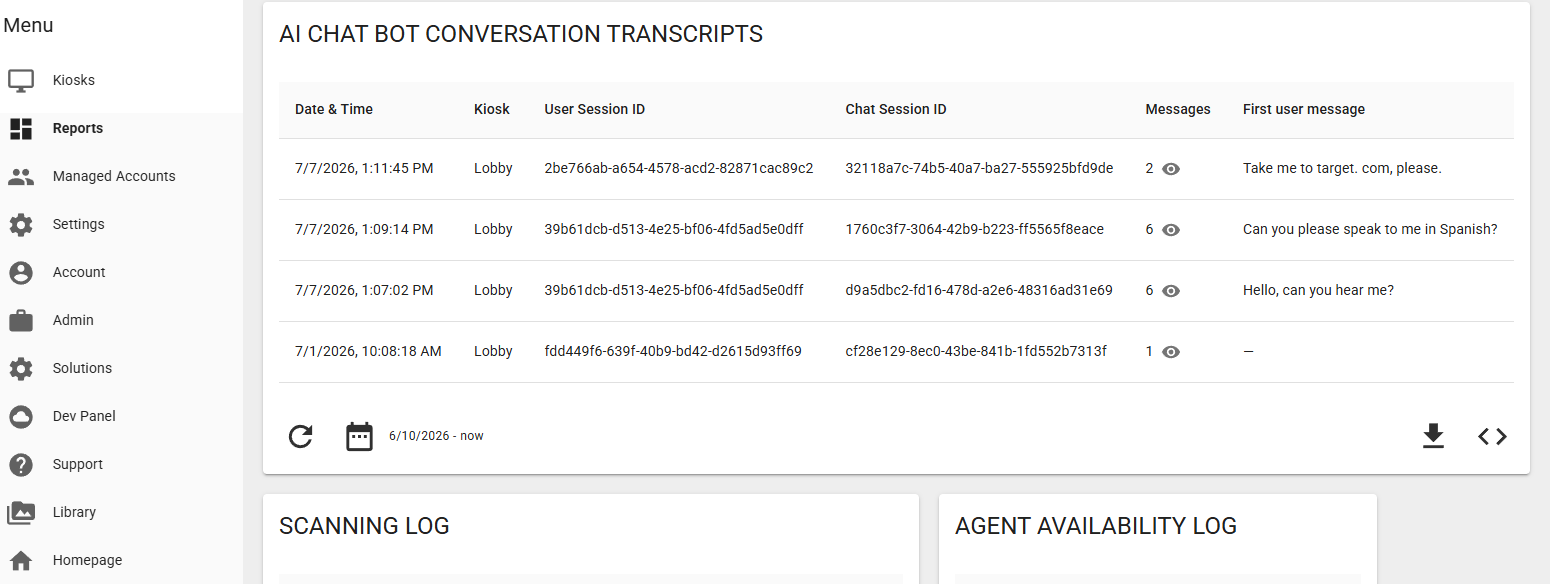
The same portal that configures a kiosk shows what it's doing — transcripts, scanning logs, and agent availability.

Zamok management portal reporting view showing conversation transcripts and logs
What's included
Honest scope

Some tasks are handled by customer administrators in the portal; others require remote support from our team. We'll be explicit about which is which for your configuration — the exact division of duties is pending validation.

Related Zamok pages

Where to go next

Software & Security
Protect the public session »
Reporting & Analytics
What the fleet is doing »
Developers & Integrations
Connect your systems »

See how Zamok would manage your fleet

Tell the Advisor how many kiosks and locations you're planning and it'll outline the management model.

Some remote services performed by the Advanced Kiosks team require an active support-services plan.