

The AI Assistant is part of Zamok Kiosk Software, running on Advanced Kiosks hardware — one guided, secure experience from the screen to the machine.
The whole assistant, one view
What it is, what powers it, and the controls that make it safe for a public lobby — before we go deep on any one part.
The kiosk shows the client's own content — their site, their app, their forms. The AI is what makes that content usable by people who don't know how to navigate it. That's the whole frame. Not a chatbot bolted on, not a robot filling out forms. A knowledgeable guide, available to everyone who walks up, in their own language. Establish that and every section below lands where it should.
What it does — and, just as important, what it isn't
Let's clear the air first, because most people meet this feature already carrying baggage.
Most kiosk content assumes visitors already know what they're doing. Many don't, can't read what's on screen, or don't know where to begin — and give up. The assistant closes that gap: it reads the screen, understands the request in plain words or another language, and guides them to the right place.
The assistant is a guide beside the content, not a robot operating the screen. It reads the page and answers questions about it. It can navigate to a page or open a Zamok function directly. What it doesn't do out of the box is fill fields and click through third-party websites step by step — every site is built differently. The real value is understanding and routing, and that doesn't need inflating.
There's real hostility to AI right now — some because people don't understand it, some because they feel their job threatened. Don't pretend that isn't in the room. The move isn't defensiveness ("unlike everyone else, we…"), it's honesty: this is designed to support the people using the kiosk and the staff behind it, not replace either. When a skeptic realizes you're not overselling, you've earned the rest of the conversation.
Your website, your web app, or a custom interface
One of the most common points of confusion — so let's make it simple. Whatever you already have, the kiosk can present it, and the assistant guides people through it.
Zamok runs a secure, locked-down browser on the kiosk. What loads inside it is up to you — and clients arrive imagining three different things. The good news: they're all right, and the assistant works the same way across all three. Pick the one that sounds like you:
How it fits The webview holds whatever you bring. The assistant sits alongside it — not replacing it, not interfering — guiding the visitor through it.
This exists to end a specific confusion. Some clients are relieved to hear it's their existing website joined by a simple homepage. Others picture their web app locked down. Others only relate to the kiosk interface we design. All three are valid and none is lesser — don't let a prospect think they've chosen the "wrong" one. Point at whichever box is theirs, then point at the AI layer: "that part's the same for everyone."
Standing by, or hands-on — the visitor decides
The assistant doesn't seize the interaction. It greets, then steps back unless it's wanted. This is the heart of "supports, doesn't block." Flip between the two paths:
Parallel, not linear Engagement is the visitor's choice. The assistant is a standing offer of help — it never traps someone in a conversation to get to their task.
This is the picture that separates you from the thing people hate. The website chatbot intercepts — you can't get your answer until you get past it. This waits. If a buyer's worried the AI will annoy their visitors or get in the way, this is the slide: greeting, then a fork, and one whole branch is "does nothing until asked." Lean on it.
What you can use it for
A few of the possibilities — grouped by the kind of value they create. This isn't a fixed menu; with the right briefing, the patterns below stretch to fit almost any public-service setting.
A kiosk homepage can hold maybe a dozen buttons before visitors feel lost. A system prompt can hold an unlimited list of resources, each with a description and a destination.
The help desk staffed by volunteers is empty by 4:30, or was never funded at all. The assistant offers that same first-line guidance whenever the doors are open.
People wait in the wrong line all the time. Briefed on what your office does and doesn't handle, the assistant can triage before someone loses twenty minutes.
Every field has language outsiders don't speak. The assistant can explain your terms in plain words — in any of its languages — without anyone feeling talked down to.
Reading the page in front of the visitor, the assistant can explain what a form is asking and what to have ready — grounded in what's actually on screen.
Told your building's layout, the assistant can give directions as easily as information — the physical and the digital, from one place.
Instead of a star-rating nobody fills in, the assistant can simply ask — "How did that go? Anything we could do better?" — and capture the answer in plain language.
Briefed with what's current, the assistant can surface the thing a visitor would otherwise miss — a closure, a deadline, a document to bring next time.
Don't recite these. Find the one that matches the prospect's daily pain and tell it as their story. A court clerk feels "am I in the right place?" and the jargon translator in their bones; a DMV feels the limitless homescreen. The pitch is always the same: this is the knowledgeable helper you can't afford to station at every kiosk — and it scales to whatever you brief it on. Let them add the use case you didn't think of; that's the sign it landed.
It speaks their language — automatically
No language selector, no configuration, no separate deployments. The single strongest equal-access story in the product. Switch languages and watch both the chat and the page follow:

Detected, not selected The assistant detects the language a visitor is using and responds in kind — and can translate the entire on-screen page on demand, every label and button, not just the chat.
For most of the world's major languages, a visitor can do everything — speak, listen, read the screen translated, and type. Across many more, text conversation and translation are available even where natural voice isn't yet. The coverage keeps growing as the underlying models expand.
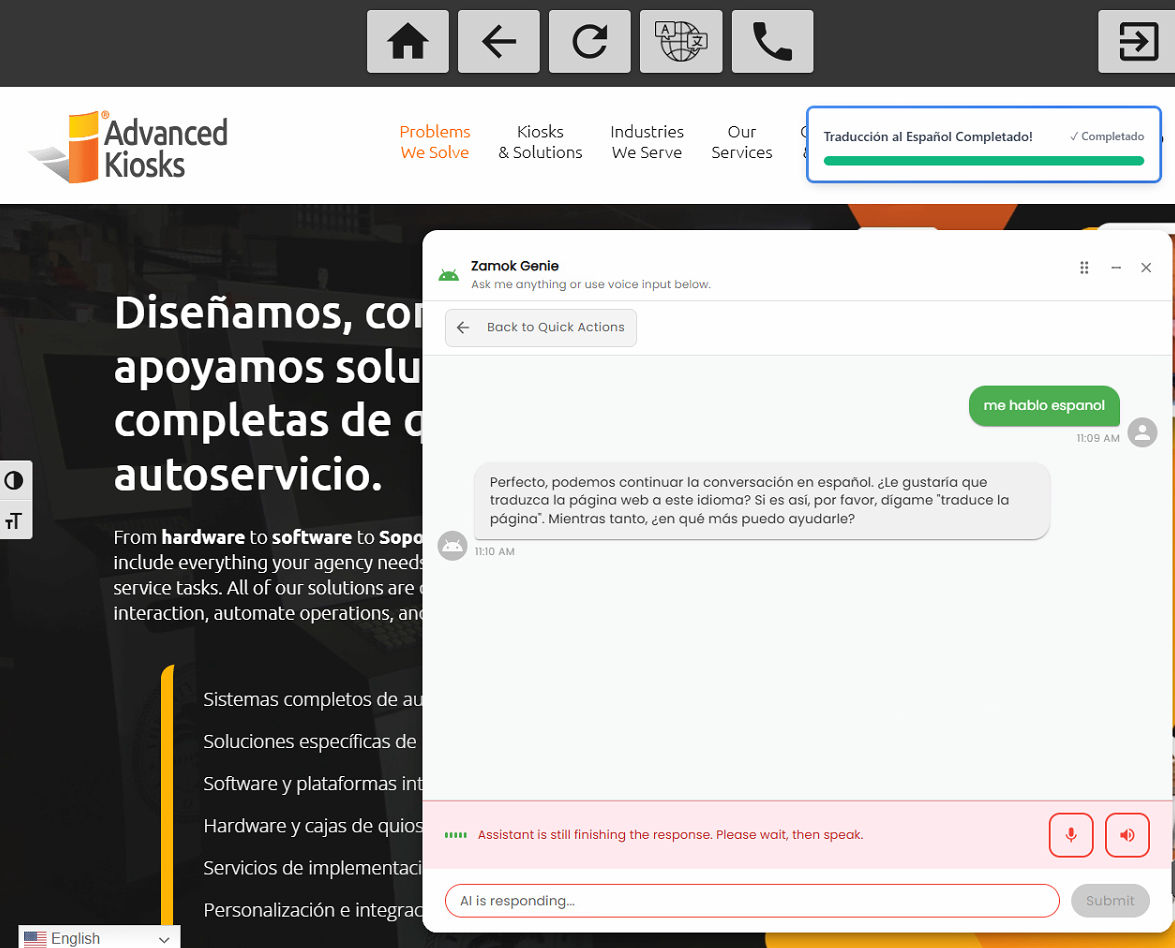
To operations buyers, this is staff relief — no one pulled off their work to interpret routine questions. To anyone who cares about fairness (judges, directors, public leadership), it's equal access. And if someone asks why the three numbers differ, that's a gift: text understanding is broadest, natural voice is the most specialized, translation sits between. Precision reads as credibility.
It knows your context — because you teach it
This is what separates a genuinely useful assistant from a generic chatbot. The system prompt is where you brief it on your world.
Out of the box the AI has broad general knowledge. What it doesn't have is knowledge of your organization. You give it that through the system prompt — a plain-language briefing you write in the dashboard. See the difference it makes on the exact same question:
Your organization's name and purpose. Common questions and their answers. Terms visitors won't know. Form names and what they're for. Procedures, hours, locations, policies. Anything a well-trained volunteer at an information desk would carry in their head.
The platform is the delivery mechanism; the system prompt is where the value actually lives. A client who invests in a thoughtful briefing gets a categorically better result than one who leaves it thin. This is exactly why onboarding matters — our team's job isn't to flip settings, it's to help write the briefing that makes the assistant genuinely useful. (Document upload to extend that knowledge is on the roadmap; today it's the system prompt.)
It acts — not just answers
The assistant doesn't stop at telling people things. It can do things — and the range of what it can do is the range of what your kiosk can do.
Above reading the screen and answering, the assistant can be given tools — actions it invokes on its own when the conversation calls for them. No buttons, no menus, no scripted triggers. Tap a spoken request and watch what fires:
Crucially, this isn't limited to a fixed handful of actions. Effectively any capability the Zamok platform already has can be turned into a tool the assistant can call. If the kiosk can do it, the assistant can be set up to do it on a visitor's spoken request.
Because tools map to Zamok's own capabilities, the assistant's reach expands as the platform does. Every function we add becomes something the assistant can potentially do for a visitor — which is a large part of why this feature keeps getting more capable.
Built with the onboarding team — by design
Tools are configured with Advanced Kiosks' onboarding team, not self-served from an admin panel. That's a deliberate quality-and-safety decision, and it's why onboarding is something we sell alongside the product.
Getting real value from an AI assistant is about configuring it well — the briefing, the tools, the scope. Our platform experts do that with you, so your team doesn't have to become AI specialists.
An assistant set up around your actual workflows, with the right actions wired to the right moments — tested and tuned before it ever faces the public.
The headline is "it acts, it doesn't just answer" — and the ceiling is the whole Zamok platform, which is a big, true claim. You don't need to explain how tools are built to sell that; keep the mechanics backstage. Frame onboarding as the outcome, not overhead: the gap between an interesting demo and a deployment that changes how an office runs is configuration — and that's what the onboarding engagement delivers. Clients aren't buying setup hours; they're buying our judgment about how to do this right.
Speaker phone, handset, or text
The kiosk hardware supports two physical audio modes — and the assistant knows which one the moment calls for. Visitors can also mute either direction at any time. Try the controls:
Speaker phone
DefaultGreat for quick interactions and calmer spaces. The visitor speaks and listens hands-free — nothing to pick up, nothing to press.
Background voices can interfere. The assistant notices when it's noisy and suggests the handset.
In a public lobby, a speaker-phone conversation about someone's case or account is heard by everyone in line. The handset gives privacy without a separate room. In regulated or sensitive settings, lead with privacy when you introduce this — it lands harder than audio quality.
Proactive greeting, always page-aware
It knows when someone has arrived, and it knows what they're looking at.
Face detection as a greeting trigger
Using the camera and on-device detection, the kiosk can open the assistant and greet a visitor as they approach — then reset when they leave.
On-device detection senses a face is present, waits a configurable moment, and opens with a spoken welcome. When the visitor steps away, the session resets for the next person.
Turn a screen people walk past into one that invites them in — especially where visitors aren't sure the kiosk is for them.
Awareness of the current screen
Whatever the visitor is viewing, the assistant reads the page before answering — so responses are grounded in what's actually there.
It retrieves the page's content before responding, and re-reads after navigation or a form submission — so it's never answering about a stale screen.
Visitors can ask "what does this want from me?" about the exact page in front of them and get a specific answer, not a canned one.
Face detection senses that a face is present — not who. On-device, not stored, not recognition. The framing that defuses it: the same idea as an automatic door sensing someone approach. Call it a greeting trigger and the concern usually never forms.
Managed from one cloud dashboard
Everything the assistant says and does is configured centrally — no code, no per-device visits.
Administrators shape the assistant from one dashboard: how it greets, what it may discuss, which tools it can use, and which voice it speaks in. One control matters most for trust — information scope. Set it and see the same question answered differently:
One configuration inherited by every kiosk in the fleet — greeting, scope, voice, tools, briefing.
Select one kiosk and override any default — a lobby unit and a records-room unit can behave differently.
Shared defaults, per-kiosk overrides. Every kiosk starts from one shared configuration. When a location needs to behave differently, an administrator selects that kiosk and overrides the defaults for it. Three kiosks can run three personalities from the same portal.
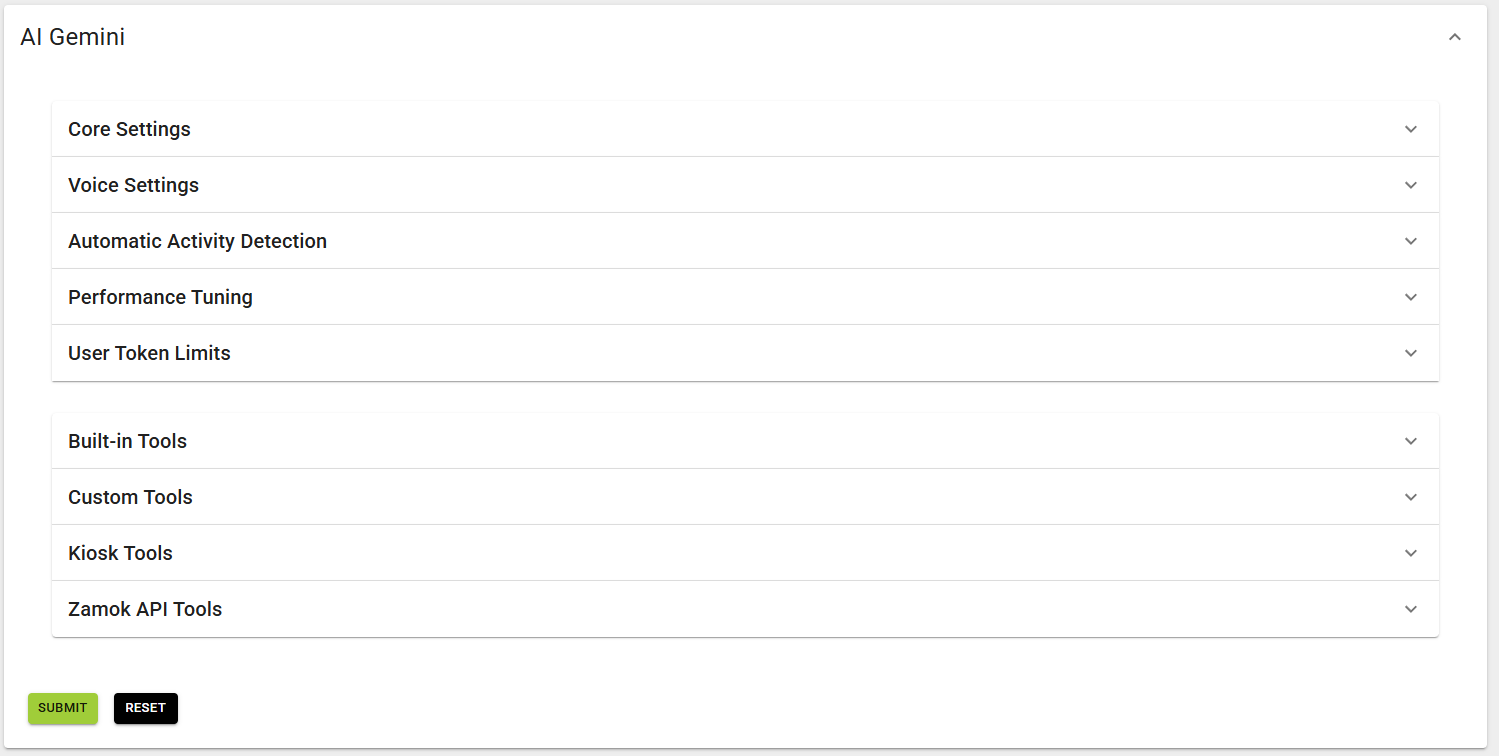
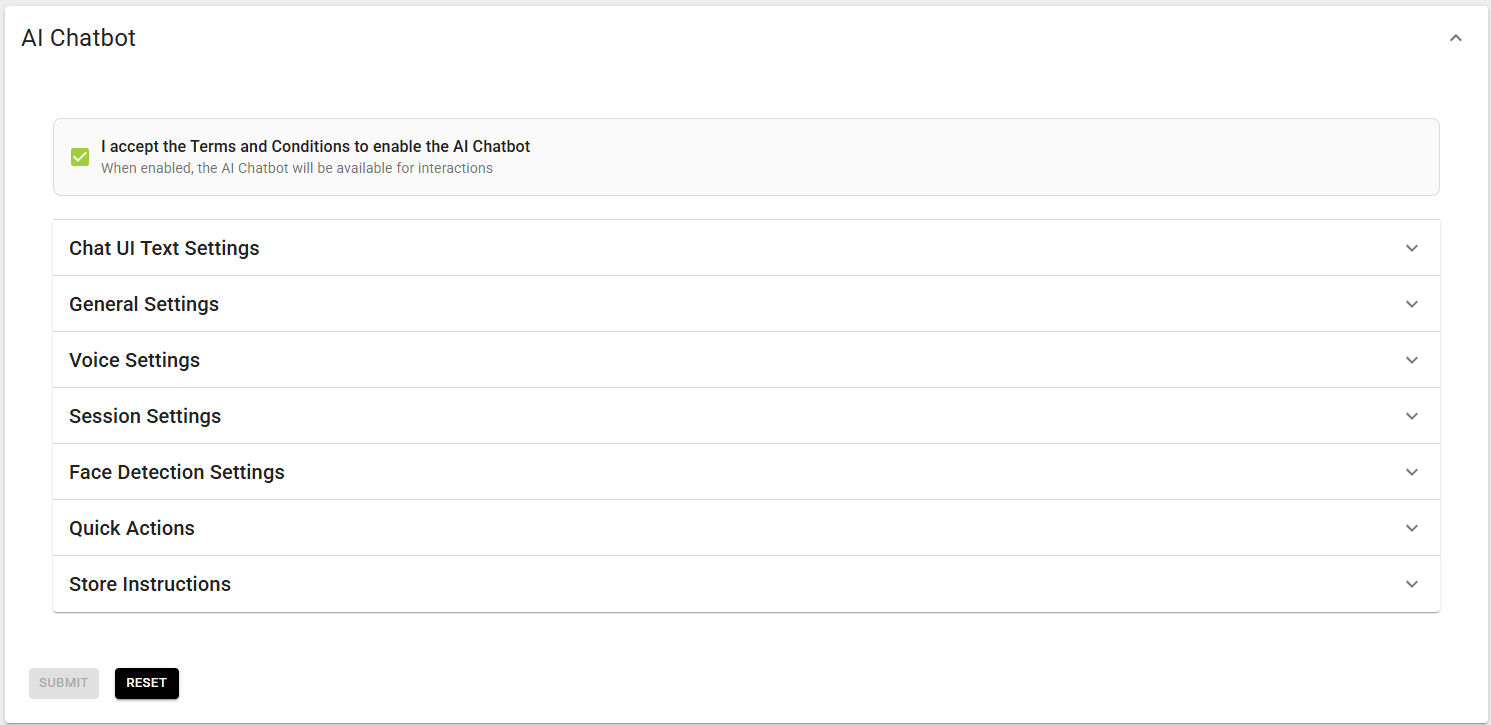
When someone asks "what if it says something wrong?" — scope is the answer. In Strict mode it draws only from the briefing; if it lacks the information it says so and points to a person. It doesn't improvise. That's a setting the client controls, not a promise you're making for them.
Reporting, and a human in the loop
The dashboard that configures the assistant also shows what it's doing.
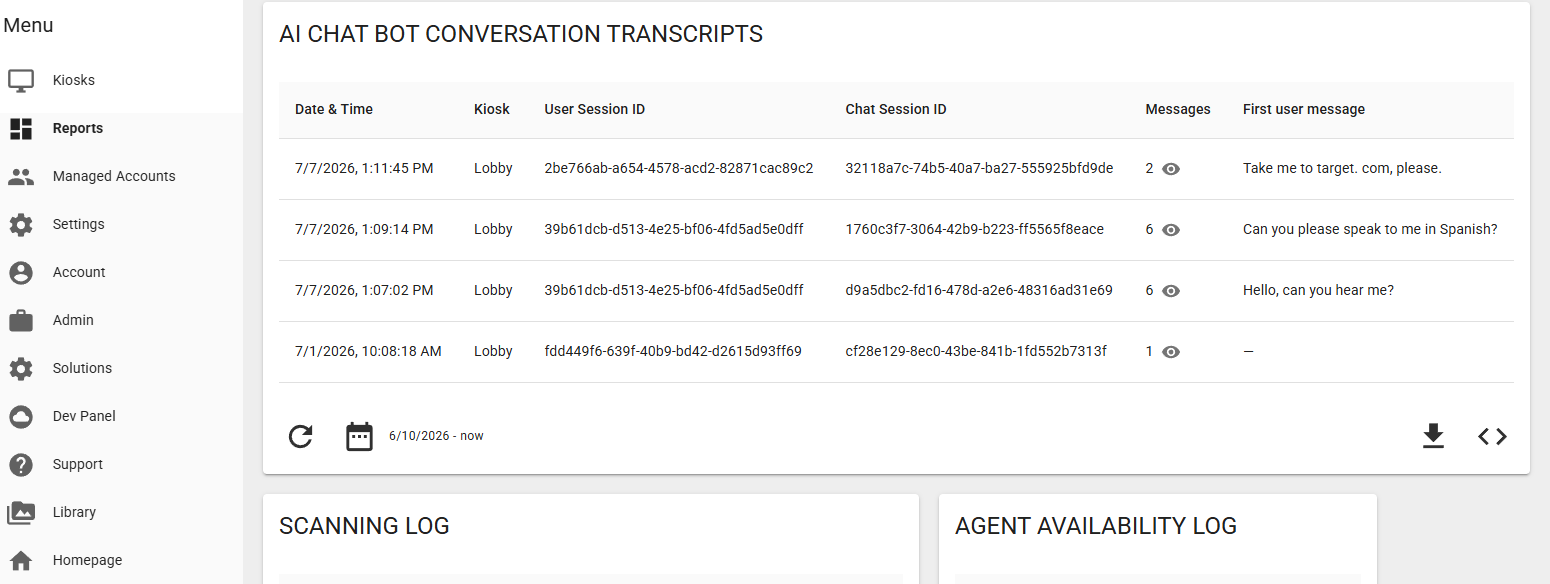
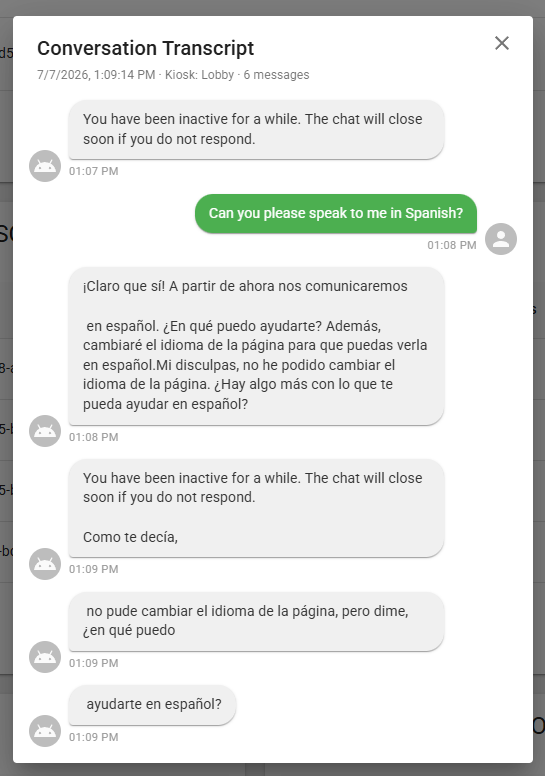
Two kinds of insight. Usage statistics show how much the assistant is used, so you can see demand and validate the deployment. And full conversation transcripts let a person review exactly what it said — the human-in-the-loop that keeps AI accountable.
Transcripts for auditing and improvement
Each conversation is captured as a reviewable transcript in the dashboard — for auditing, quality review, and refining the briefing.
See what visitors really ask, find gaps in the briefing, catch anything worth correcting, and feed it back into a better configuration.
Skeptics don't fear what the AI does — they fear what it does unwatched. Transcripts answer it flatly: a person can read every conversation. Pair it with privacy next and you've handled the two questions that sink most AI deals — "can we watch it?" and "where does the data go?"
Privacy, and what actually powers it
One coherent posture: whose models, whose policies, and what becomes of the conversation.
Google's models — by opt-in, not by default
The assistant runs on Google's Gemini models through the API. Not home-grown, not a third-party wrapper — the same infrastructure organizations across every industry are adopting, with Google's published security and privacy commitments behind it.
Your organization opts in when you deploy it; visitors opt in when they engage. The conversation is processed by Google's models under Google's policies.
A named, established commercial model with documented policy and accountability — not an unvetted black box.
Sessions wipe; stored transcripts carry no personal details
Conversation history is cleared at the end of every session — nothing carries to the next visitor. Transcripts kept for review are processed through Google's Sensitive Data Protection to remove personal information before storage.
Offer human-in-the-loop review and a clean privacy answer at once: the transcript exists for auditing, without personal details sitting in storage.
What a visitor says is processed by Google's model to answer them — that's how any AI assistant works. The posture isn't "your words never leave the kiosk." It's: processed under Google's policies, stored transcripts stripped of personal information, session history wiped every time.
A major commercial model with a published privacy policy is the reassuring answer, not the awkward one. A technical buyer trusts a documented Google API over a proprietary black box with no paper trail. Say it with confidence: "we use Google's models responsibly, by opt-in — not wrapped, not home-grown, with a privacy policy you can actually read."
For the people wary of AI
Most resistance isn't about features — it's about fear. Each fear has a concrete answer already built into the product. Tap a fear to reveal the answer.
Half of selling AI into cautious places is a credible reason not to be afraid. This grid is that reason, and each answer maps to a real feature in this document. It works best when you raise the fear before they do — "the first question is usually whether it makes things up, so let me answer that" signals you've heard it and have a real answer, not a dodge.
Feature matrix
A reference scan of what's built in, what's configured, and what's set up with the onboarding team.
Deliberate about AI — because you should be too.
We've used AI aggressively inside our own operations for a while now. We were far more careful about putting it into the product we hand to you. For a long time the technology wasn't reliable enough to trust in front of the public — so we waited, and we built this to support the services, information, and access you already offer, not to sprinkle on a gimmick. It's a real, current capability, and we're still expanding it. That pace is the point: value first, caution always.